Learning Centre

Read our latest blogs
and media releases

Get quick tips and the latest updates on our ecosystem and learn how Shop2Shop is helping local entrepreneurs thrive.

Read our latest blogs and media releases
Get quick tips and the latest updates on our ecosystem and learn how Shop2Shop is helping local entrepreneurs thrive.

Everything you need to thrive

Search our learning centre for quick guides, expert tips, and step-by-step tutorials designed to help you run your business like a pro.

Everything you need to thrive

Search our learning centre for quick guides, expert tips, and step-by-step tutorials designed to help you run your business like a pro.
General

Shop2Shop is a payment solution that brings together everything you need to run your business. Our devices let you pay and get paid fast, sell VAS services and get business funding and insurance. It’s a simple and safe way for businesses in the formal and informal sector to grow with confidence.

Your shop code links all your personal, business information and device information. This means your sales history and balances are also linked to your shop code. You should avoid creating a new shop code unless you are starting a new business that is not linked to your current shop.

Our rewards programme is linked to your activity in the Shop2Shop ecosystem. For example, the more card payments you accept the greater your rewards will be. You also accumulate rewards by using Shop2Shop services like doing a money transfer the app, selling VAS through the Profit+ qualifies or taking a Stock Advance. In short, the more you use the Shop2Shop ecosystem to perform daily trading activities, the more you get rewarded.

You can pay a supplier directly from the Shop2Shop mobile app or on the Tap2Pay device. From the home screen, tap on PAY SUPPLIERS, and choose the supplier from the list. Enter the amount, your reference or invoice number and the shop account. Tap on PAY to complete the transaction. You can also select the GET PAID function next to the camera icon and your customer can scan your QR code. You can only redeem rewards like this, when you pay using Scan2Pay.

You can receive payments in person by presenting your shop’s QR code on the mobile app or Tap2Pay device. You can also send your QR Code to a debtor via WhatsApp. This payment method is available between Shop2Shop customers only and will reflect in the app immediately.

Shop2Shop App

The app helps you run your business from one place. You can track sales, resend invoices, manage cash flow, pay suppliers, send money, top up VAS services and apply for business funding and insurance.

Your money stays safe. Your account is protected by a secure login and we can assist you in case your phone is lost, stolen or damaged. Call our Care Centre to report your stolen phone and for further assistance.

You choose who you give access to the Shop2Shop app. You can log in to the Shop2Shop app using your username and password. If you have multiple tillpoints in your store you can set up multiple card machines linked to one Shop Code and you can control the Shop2Shop app while each person has their own device to accept card payments.

Yes. You can view your full transaction history at any time, including payouts, VAS sales, transfers and card payments, making it simple to track your business’ performance.

Very little. The app is designed to work smoothly on low-bandwidth connections, so you can manage your business even with limited data or slower network coverage.

Tap2Pay

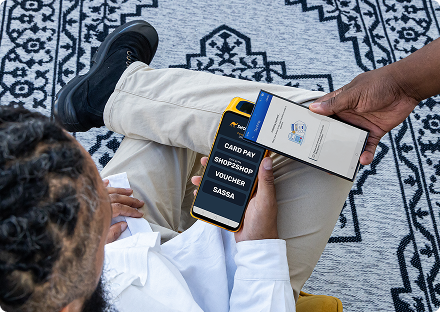
Tap2Pay devices accept payments, sell VAS products like airtime and electricity and process cash-outs. They also connect to your Shop2Shop app on your phone for a complete business management solution.

Yes, the Shop2Shop app connects directly to your device. It’s where you manage payments, track transactions, pay suppliers and control your business finances. You can also apply for business funding and insurance directly from the app.

Shop2Shop offers a range of Tap2Pay devices to fit your needs. You can choose from compact card-only models to dual-screen, all-in-one devices.

Simply order your device, download the Shop2Shop app, register your shop and link your device to your Shop Code. Once linked, you can start trading immediately and all the card payments received on your device will reflect in your Shop2Shop account in the Shop2Shop app.

Yes, every Tap2Pay device runs on secure, encrypted systems within the Shop2Shop ecosystem. Your transactions and business funds are always protected by advanced security technology.

EasyVoucher

An EasyVoucher is a prepaid voucher that provides a PIN which can be used to top up airtime, data, WiFi or other services like gaming accounts. You can also redeem your voucher at participating stores to buy groceries.

  • For airtime or data, dial *130*7467*VoucherPin# and select the product you want.
  • For WiFi, enter the voucher PIN on the WiFi provider’s portal when connecting to their network.
  • For gaming or other services, use the voucher PIN on the deposit or top-up page of the respective platform.
  • For shopping, provide the store owner with your voucher PIN to pay for your groceries.

Yes! You can share an EasyVoucher code with a friend or family member anywhere in South Africa. It’s a quick and simple way to help someone stay connected or top up when they need it.

EasyVoucher saves time and reduces mistakes. With one product for all networks and services, there’s no confusion and no wrong-network issues for customers.

Yes, Easyload vouchers usually have an expiry date of 36 months from the date of purchase. Be sure to check the expiry information before purchasing or redeeming the voucher.

Money Transfer

For first-time clients, the maximum value is R5,000 per transfer. For repeat clients, the maximum value is R5,000 per day, limited to a maximum of R25,000 per month.

The sender can specify how the money can be withdrawn by the receiver. You can choose Mobile Money, Bank Transfer or Cash Pickup, depending on your preference and collection options available per country.

Choose the U.S. Dollar amount you want to send. Fees will be shown upfront, with a full South African Rand breakdown and the estimated amount your recipient will receive. The in-country branch for collection may charge an additional collection fee.

Yes, you can, you can send 7 days a week, 365 days a year.

A transaction cannot be reversed. Please confirm all details before you transfer. Shop2Shop cannot be held responsible for a payout to the wrong person if the wrong information is provided.

Profit+

Profit+ is a value-added services (VAS) solution by Shop2Shop that allows traders and small businesses to sell services like airtime, data, electricity and gaming vouchers directly from their Tap2Pay device.

Profit+ is available on the P2, P3, P14 and T6 devices. Once your device is set up, you can register for Profit+ and start trading and earning right away.

To register, open the Profit+ app on your Shop2Shop device and tap Register.

  1. Tap Yes to confirm self-registration.
  2. Fill in your shop’s details.
  3. Tap Register again to complete.

You’re now ready to sell VAS with Profit+.

Watch the video on How to Self Register for Profit+

Profit+ enables you to offer additional services to your customers, including bill payments, airtime and data sales. You also earn commission on products sold through Profit+, allowing you to generate additional income while offering greater convenience and positioning your store as a one-stop business solution.

If you have problems such as incorrect voucher prints or missing products, check the Troubleshooting section in your Profit+ app. You can also ensure your app is updated to the latest version for the best performance. You can WhatsApp our Care Centre for further assistance on: 062 467 5939.

Support Videos

Read our latest blogs

Get quick tips to help you run your business better

Want to speak to us directly?

Contact our Care Centre

021 023 0291

Chat to us: